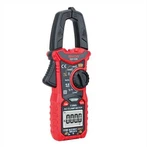
Common measurements and precautions of multimeter

2 . 2 . 1 Voltage measurement
When measuring DC voltage, insert the red test lead into the "V%" jack, which is a positive test lead, and insert the black test lead into the "C O M "jack, which is a negative test lead. Turn the measurement selection switch to the DC gear "V -", and the digital multimeter constitutes a DC voltage. The voltmeter can be directly connected to both ends of the measured voltage in parallel to measure. When measuring AC voltage, insert the red test lead into the "V%" jack, the black test lead into the "C O M" jack, turn the measurement selection switch to the AC voltage level "V t", the digital multimeter constitutes an AC voltmeter, and is directly connected to the The measured voltage can be measured at both ends.
2 . 2 . 2 Current measurement
When measuring DC current, insert the red test lead into the "m A" jack or "A" jack, which is a positive test lead, and insert the black test lead into the "C O M" jack, which is a negative test lead. Turn the measurement selection switch to the DC current gear "A" -"Digital multimeter constitutes a DC ammeter, which can be measured by connecting people in the current circuit under test. When measuring a DC current below 200mA, the red test lead should be inserted into the "mA" jack; when measuring a DC current of 200mA and above, the red test lead should be inserted into the 'A' jack. Measuring AC current is similar to measuring DC current. Turn the measurement selection switch to the AC current gear "A -", the digital multimeter constitutes an AC ammeter, and it can be measured by connecting it to the current circuit under test. When measuring the AC current below 200mA, insert the red test lead into the "mA" jack; when measuring the alternating current above 200mA, insert the red test lead into the "A" jack.
2 . 2 . 3 Resistance measurement
To measure the resistance, insert the red test lead into "V%", the black test lead into the "C O M jack", turn the measurement selection switch to the resistance level "%', and the digital multimeter constitutes an ohmmeter. When measuring, put the two test leads (regardless of positive and negative) Negative) connected to both ends of the measured resistance, the LCD display will display the resistance value of the measured resistance R. The "%" range of the measurement selection switch can be selected according to the estimated value of the measured resistance. If the display is only "1" is displayed in the highest digit, which means that the selected range is less than the estimated value of the measured resistance. If the display only displays "1" in the highest digit, it means that the selected range is smaller than the measured resistance value, which is better than using an analog multimeter Convenient.When measuring large resistance, it is normal for the reading on the LCD display to stabilize after a few seconds.
2 . 2 . 4 Capacitance measurement
When measuring capacitance, turn the measurement selection switch to the capacitance position "F" without connecting the test lead, and the digital multimeter constitutes a capacitance meter. Just insert the measured capacitor C into the "C X" jack on the left side of the digital multimeter, without considering the polarity of the capacitor, and it is not necessary to discharge the capacitor in advance. The "F" range of the measurement selection switch can be selected according to the estimated value of the measured capacitance. If the display only shows "1" in the highest digit, it means that the selected range is smaller than the measured capacitance value, and a higher range should be selected for measurement. When measuring bulk capacitance, it takes a certain amount of time for the reading displayed on the LCD display to stabilize, which is a normal phenomenon.
2. 2. 5 Diode and triode measurement
When measuring diodes, insert the red test lead into the "V%" jack, which is a positive test lead, and insert the black test lead into the "C O M" jack, which is a negative test lead. Turn the measurement selection switch to the diode and on-off position, and connect the positive test lead to the diode under test. The positive and negative test leads are connected to the negative pole of the diode under test, and the forward voltage drop of the diode can be measured. On-off test can also be carried out in this gear, connect two test leads to two points of the tested circuit, if the buzzer in the digital multimeter sounds, then the two points contacted by the two test leads are conducting or the resistance is lower than 9 0%. When measuring the DC magnification of the crystal triode, you don’t need to connect the test lead, just turn the measurement
Select the switch to the transistor parameter file "hff", and insert the measured transistor into the transistor hole in the upper right corner of the digital multimeter control panel to measure. The left half of the transistor jack is marked "P NP" for measuring PNP transistors; the right half is marked "NP N" for measuring N P N transistors. For example, measure the S9014 transistor, because the S9014 transistor is an NPN type transistor, so it should be inserted into the right half of the jack, and the LCD screen will display the DC magnification of the S9014 transistor.