Phase sequence detection of Pen type NCV smart multimter GD109
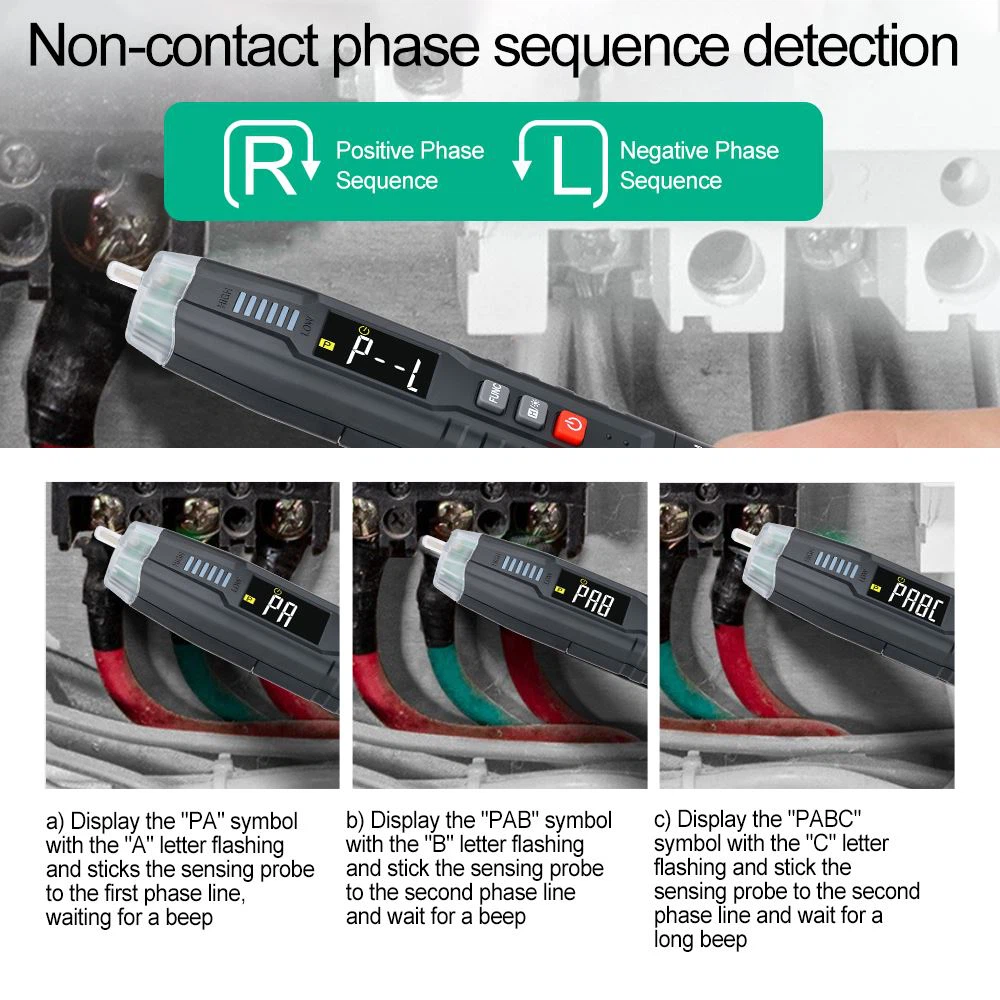
◆Press the button to turn on the power of the instrument,
◆Press "FUNC" key to select "P" gear.
The display screen flashes the "PA" symbol, put the induction probe against the first phase line, and wait for a beep
●The display screen flashes the "PAB" symbol, put the induction probe against the second phase line, and wait for a beep beep
●The display screen flashes the "PABC" symbol, put the induction probe against the third phase line, and wait for a beep.
When the test is over, the measurement result is displayed on the display.
The "P---L" symbol indicates that the phase sequence is left-handed
The "P---R" symbol indicates that the phase sequence is right-handed
Note 1: Please keep the induction probe close to the wire
Note 2: Shielded wire/cable, thickness and type of insulation, or complete insulation can all have an effect on detection
Note 3: Please complete the test of the three wires within 1 minute, otherwise, a detection timeout error will occur, the prompt is PABC symbol, and the letter P flashes. When a time-out error occurs, please return to phase sequence detection and re-detection.
Note 4: When the three phase lines are very close, separate the lines as much as possible to detect, otherwise it is easy to misjudge