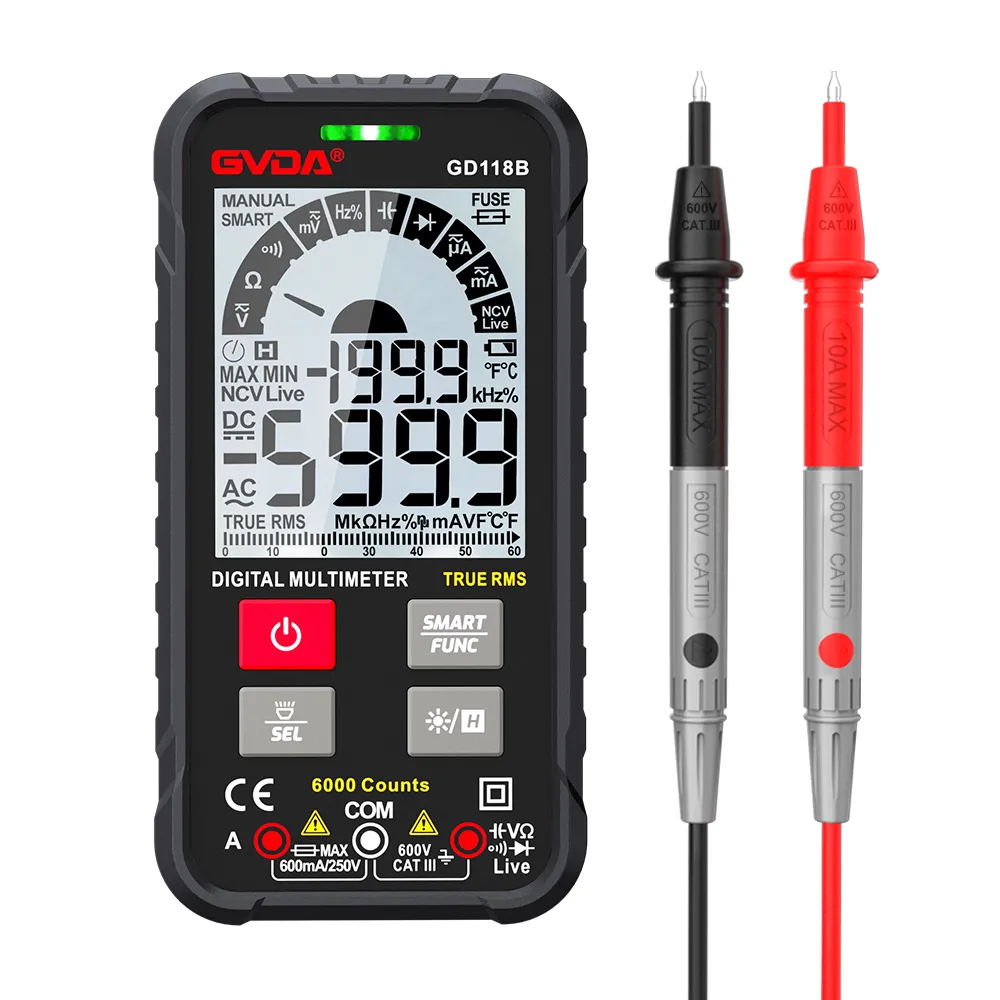
The working principle and characteristics of the digital multimeter:
The double integral A/D converter is the "heart" of the digital multimeter, through which the conversion of analog quantity to digital quantity is realized. The peripheral circuit mainly includes function converter, function and range selection switch, LCD or LED display, in addition to buzzer oscillation circuit, drive circuit, detection circuit on-off circuit, low-voltage indicating circuit, decimal point and sign (polarity). symbol, etc.) drive circuit.
The basic structure of a digital multimeter
The A/D converter is the core of the digital multimeter. It adopts the single-chip large-scale integrated circuit ICL7106. The 7106 adopts the internal XOR gate output, which can drive the LCD display and save electricity. Its main features are: single power supply, wide voltage range, use of 9V stacked batteries to achieve miniaturization of the instrument, high input impedance, and use of internal analog switches to achieve automatic zero adjustment and polarity conversion. The disadvantage is that the A/D conversion speed is relatively slow, but it can meet the needs of conventional electrical measurements.
The following is the common fault analysis, and processing methods:
(1) To check the fault of the digital multimeter, first check and judge whether the fault phenomenon is common (for example, all gears cannot be measured) or individual (for example, only the current gear cannot be measured). LCD display, should focus on checking the power supply circuit and A/D converter; if there is a problem with individual files, it means that the power supply and A/D converter are working normally, and you should refer to the unit circuit to find the fault.
(2) The minimum DC voltage range of the digital multimeter (ie, the DC 200mV range) is the basic range of the three-and-a-half digital multimeter.
(3) The basic gear of DC voltage does not return to zero. Generally, it is because the vicinity of the voltage divider resistor is dirty, so it should be wiped around the resistor to make it return to zero, and then input a 1V voltage from the DC voltage source for calibration, and adjust the DC potentiometer during calibration.
(4) The reference voltage is abnormal, and the meter always displays "1" whichever gear is turned on. Check whether there is a reference voltage of 100mV between the 35th and 36th pins of the integrated block ICL7106, and then check whether the switch VR1 potentiometer is in good condition and divides the voltage. Are the resistors R12 (4Ω) and R13 (150Ω) accurate.
(5) The numbers displayed in each gear jump around and cannot be used. Most of this fault is because the large-capacity capacitor is not discharged when measuring, and some are wrong gear when measuring, resulting in damage to the dual time base integrated blocks ICM7556 and ICL7106. When checking, first measure the current at both ends of the battery. If it is greater than 10mA, it means the 7556 is damaged; if the current is still large, the 7106 is damaged; if the current is less than 2.5mA, the current is less than 2.5mA. Explain that the other is basically normal. If it is slightly larger, it means that some capacitors have some leakage. After replacing the damaged components in time, first check whether the 200mV gear is normal, and then test other functions.
(6) The buzzer does not sound. If the indicator light is on, it may be the CD4011 NAND gate integrated block is damaged; if the light is not on, it may be the dual op-amp circuit integrated block TL062 is damaged, half of its pins are AC current, half of the buzzer, hit the buzzer Buzzer gear, the sound means that the half of the tube buzzer is fully charged; hit the AC 2V gear, touch the input end with a screwdriver, and display "1", it means that the AC half of the tube is fully charged.
(7) "1888" is displayed when the power on caused.
The digital multimeter should be cleaned regularly, otherwise it will be easy to short circuit and cause the meter to work abnormally.
Nine major troubleshooting experience of small digital multimeter
Phenomenon: The display of AC current and voltage is not zero when there is no voltage input.
Reason 1: After opening the case and observing carefully, it is found that the watch has been used for a long time, and the switch contacts have been seriously polluted. Wherever the switch contacts pass, there are black traces contaminated by copper powder. These contaminations constitute a certain amount of voltaic batteries with irregular capacity, whose voltage affects the measuring mechanism, so the display of each gear cannot be returned to zero.
Solution: Use a brown brush to dip in aviation gasoline, clean the switch contacts, and then clean the pollution with clean water. After drying, the display of each gear of the communication will return to zero, and the fault will be eliminated.
Reason 2: There is an AC amplifier in the AC voltage measurement circuit, and a feedback capacitor is connected between the output end and the input end. When the feedback capacitor is open, the high-frequency signal will follow the measured signal directly into the measuring mechanism. In the case of no input, the interference signal of the external electric field will also be directly amplified, showing the phenomenon that it cannot return to zero. Solution: Replace the feedback capacitor of the AC amplifier, and the fault will be eliminated.
Fault 2: The 20MΩ resistance gear cannot be returned to zero, and the measurement fails.
Phenomenon: The measurement is normal in the low resistance range such as 200Ω, 2kΩ, 20kΩ, but when the resistance is set to 20MΩ, no matter the size of the measured resistance, it always shows a relatively stable fixed value, and the resistance value of the measured resistance cannot be displayed correctly at all.
Reason: After unpacking and inspection, it was found that the battery leakage was serious and had spread to the circuit board. As a result, a new path was formed, which made some circuits that were not connected to each other. It is estimated that the equivalent resistance of the leakage is 9MΩ. When measuring in the low resistance range, since the leakage resistance R leakage is much larger than the range from 200Ω→2KΩ→20KΩ, the current divided by the R leakage is very small, and the shunt effect of the leakage resistance can be approximately ignored, and the measurement results are affected by Has little effect. With the increase of the range, the influence of R leakage begins to increase. When it reaches the 20MΩ range, there will be a stable display value of 9MΩ regardless of whether there is a measured resistance or not.
Solution: wipe off all battery leakage with a dry cloth, replace with a new battery, and then turn it on to check, the fault disappears completely. Fault 3: The LCD display is incomplete.
Phenomenon: The digital strokes displayed on the LCD are incomplete, the fault disappears when you press the case hard, and the fault reappears when you let go a little. Reason: Poor contact between display chip pins, lead rubber and LCD display screen electrodes in the chassis. Solution: Take a piece of transparent plastic film, cut it into a piece of the same size as the LCD display, and put it between the display window of the chassis and the LCD display, and then tighten the screws of the rear cover to force the internal components to be in close contact. Back to normal.
Fault 4: The decimal point displayed on the LCD is misplaced.
Phenomenon: The decimal point display positions of voltage, current and resistance are inconsistent with the positions that should be displayed.
Reason: The unpacking inspection found that the positioning claw of the switch plate was broken and damaged, and the movable contact piece was deformed due to uneven force. Passed, causing the decimal point to be misplaced.
Solution: After replacing the deformed moving contact piece, the fault is completely eliminated.
Fault 5: The measurement results of the DC voltage range are inconsistent.
Phenomenon: When a stable 100V DC voltage is measured, it starts to display as 105.1V, and becomes overflow display after 2 minutes.
Reason: It has been verified that the battery used by the multimeter is insufficient. When the battery is under voltage, the standard voltage in the analog-to-digital converter of the multimeter is constantly deviated, so the indication error will increase with the continuous decline of the battery performance. The longer the time, the more obvious the indication error.
Solution: Replace the battery of the multimeter.
Fault 6: The AC voltage high-voltage gear always overflows and displays.
Phenomenon: When the AC voltage is 750V when measuring the 50V AC voltage, the display overflows.
Reason: After unpacking and inspection, it is found that there are traces of arc burn between the fixed contact pieces connected to the input channel. The plywood at this place was broken due to being burned and carbonized, so that the external measured voltage, which should have been divided by the voltage divider, was directly transmitted to the amplifier.
Troubleshooting of 3.5-digit multimeter
Most of the reasons for the damage of the digital multimeter are improper operation by the user. The main components of the instrument damage are: ① A/D converter ICL7106 or ICL7136 is damaged. ②The operational amplifier TL062 is damaged. ③Dual time base circuit ICM7556 is damaged. ④ Four NAND gate CD4011 is damaged. ⑤ The transistor Q1 (C9014) and the protection resistor PO1 (1.5KΩ) of the resistance gear overvoltage protection circuit are damaged. ⑥The leakage of capacitor C9 (35V/0.33μF) will cause the reference voltage to change and cause measurement errors. The maintenance method is described in detail below.
1. Repair power failure process
The maintenance work of the digital meter generally starts from the power supply. After the switch is turned on, if there is no liquid crystal display, you should first check whether the 9V battery is empty or the battery voltage is too low. If the battery voltage is normal, you should check whether there is a 9V voltage between V+ (pin 1) and V- (pin 26) of the A/D converter ICL7106. Only when the ICL7106 power supply voltage works in a normal state, can the cause of the fault be searched down. Finding faults should be integrated according to the first check, such as whether the reference voltage of the A/D converter ICL7106 works normally, and whether the display can display normally. As shown in the figure is the digital multimeter power supply troubleshooting flowchart.
2. Troubleshooting examples
(1) The reference voltage is inaccurate or unstable: a digital multimeter shows normal, but during the verification, it is found that the measured value is obviously low. The reference voltage is only about 75mV. Through careful inspection, it is found that there is oil pollution near the reference voltage divider R12, R13, and W1, which leads to the leakage of the printed board and the decrease of the insulation, which reduces the R12. After cleaning with absolute alcohol and drying, the problem is solved.
(2) A digital meter displays "-1" no matter which gear it hits, and the user reports that it cannot be used. Measure its working current up to 5mA, while the meter is about 1.2mA when it is working normally. Its reference voltage is also not correct. After replacing the ICL7106, the fault persists. From the analysis of the principle of the digital meter, the ICM7556 dual time base circuit is easily damaged by overload. After removing the ICM7556, the operating current drops to about 1.2mA. The voltage between the reference voltage VREF (pin 36) and COM is 100mV, which is normal. Except for the capacitor gear, the rest of the gears return to normal. From the fault analysis, when the user is measuring the capacitance, the electric charge on the capacitor is not fully discharged, so the capacitance is measured, resulting in damage to the ICM7556. The current flowing through the ICM7556 is too large, causing the COM potential to rise, thereby reducing the reference voltage.
(3) The display of a digital meter is normal, but it is found that the error is large during the verification, and the measurement reference voltage is obviously low and unstable. When the power supply is just turned on, the working voltage is measured to be 100mV, but after a while, the voltage will drop. The analysis of this phenomenon shows that a certain part of the circuit has a soft breakdown. After first pressing the ICM7556, the fault remains. Then replace the ICL7106, the working current is still too large, and the reference voltage is abnormal. Then find the voltage of each point to the common ground, and find that the voltage of each point to the ground changes to varying degrees. At this time, the 9V battery voltage is stable. However, it is found that the positive and negative voltages to the ground have changed. It can be seen that this phenomenon occurs on the devices that share the power supply. Because CD4011 only works in the buzzer gear. So focus on checking the TL062 dual operational amplifier. Disconnect its positive and negative power supply, and then measure the working current of the instrument is 1.2mA, and the reference working voltage is about 100mV, and it is stable and unchanged. It means that there is a soft breakdown inside the TL062. After replacing the chip, the fault is eliminated.
(4) A user measures the voltage in the resistance gear due to misoperation, resulting in no response when measuring the resistance with the resistance gear. The fuse PO1 (1.5KΩ) was damaged from the circuit for measuring the resistance, resulting in no response to the resistance measurement. After replacing the resistor, the problem is solved. The main reason for the failure is that when the resistance voltage is wrongly measured, the transistor Q1 (C9014) breaks down in the reverse direction, so that the current passing through the PO1 resistance increases rapidly and the PO1 resistance is burned out. If the PO1 resistance is not damaged, and Q1 (C9014) reverse breakdown short-circuit, it will cause the resistance file to not display "1" when it is open. At the same time, it should be noted that the capacitor connected in parallel with Q1 is sometimes broken down and short-circuited at the same time. Such faults often appear on digital meters such as DT890, DT9101, DT9108, and DT9107.
(5) A digital meter could not measure before. After replacing the A/D converter ICL7136 (the original one used for this meter was ICL7106), the current, voltage and capacitance files are all normal. But the resistance file cannot be measured. When the circuit is open, the number jumps and cannot be stabilized. According to the principle analysis, ICL7106 and ICL7136 can be interchanged, but there are still differences in practical application. From the analysis of the typical circuits of ICL7136 and ICL7106, appropriately increasing the integral resistance and reducing the integral capacitance on the ICL7136 will help to improve the stability of the resistance profile. The integral resistance is increased from the original 56kΩ to about 330kΩ through experiments, and the resistance profile works normally. The measurement results are accurate. At the same time, it does not affect the use of other files. This phenomenon replaces ICL7106 in DT890, DT9101, DT9102, DT9107, YDM-301 and other types of digital meters.
Digital multimeter repair tips:
For a faulty instrument, first check and determine whether the fault phenomenon is common (all functions cannot be measured) or individual (individual functions or individual ranges), and then distinguish the situation and solve the problem.
1. If all gears fail to work, focus on checking the power supply circuit and A/D converter circuit. When checking the power supply part, you can remove the laminated battery, press the power switch, connect the positive test lead to the negative power supply of the meter under test, and connect the negative test lead to the positive power supply (for digital multimeters), switch the switch to the diode measurement gear, if the display shows If it is the forward voltage of the diode, it means that the power supply part is good. If the deviation is large, it means that there is a problem with the power supply part. If there is an open circuit, focus on checking the power switch and battery leads. If there is a short circuit, you need to use the circuit breaking method to gradually disconnect the components that use the power supply, focusing on checking operational amplifiers, timers, and A/D converters. If a short circuit occurs, more than one integrated component is generally damaged. The A/D converter can be checked at the same time as the basic meter, which is equivalent to the DC meter of an analog multimeter. The specific inspection method is as follows:
(1) The range of the meter under test is turned to the lowest level of DC voltage;
(2) Measure whether the working voltage of the A/D converter is normal. According to the A/D converter model used in the table, corresponding to the V+ pin and COM pin, compare the measured value with its typical value.
(3) Measure the reference voltage of the A/D converter. The reference voltage of the commonly used digital multimeters is generally 100mV or 1V, that is, the DC voltage between VREF+ and COM is measured.