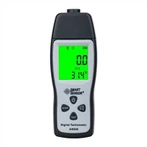
Commonly used methods and solutions for digital clamp meters
1. AC current measurement
① Turn the switch to ACA1000A.
②Keep the switch in the relaxed state.
③ Press the trigger to open the jaws and clamp one wire. If more than two wires are clamped, the measurement will be invalid.
④ Read the value. If the reading is less than 200A, turn the switch to ACA200A to improve accuracy. If it is impossible to read directly in the dark due to environmental conditions, press the hold button and read in a bright place.
2. AC and DC voltage measurement
① When measuring DC voltage, turn the switch to ACA200A. When measuring AC voltage, turn the switch to ACV750V.
②Keep the switch in the relaxed state.
③The red test lead is connected to the "V/Ω" terminal, and the black test lead is connected to the "COM" terminal.
④The red and black test leads are connected in parallel to the circuit under test.
3. Resistance measurement
① Turn the switch to the electrical barrier of the appropriate range.
②Keep the switch in the relaxed state.
③The red test lead is connected to the "V/Ω" terminal, and the black test lead is connected to the "COM" terminal.
④The red and black test leads are connected to both ends of the resistor under test. When measuring the line resistance, the line should be disconnected from the source, and the resistor connected should be discharged.
4. Continuity test
① Turn the switch to 200n.
②The red and black test leads are connected to the "V/Ω terminal and COM" terminal respectively.
③If the resistance between the red and black test leads is less than (50±25)Ω, the built-in buzzer will sound.
1-Clamp head 2-Clamp head trigger 3-Hold switch 4-Rotary switch 5-Display 6-Insulation test accessory interface 7-Public ground terminal 8-Voltage resistance input terminal 9-Portable strap.
5. High resistance measurement
① Turn the switch to the "EXTERNALUNlT" 20MΩ or 2000MΩ position.
②The displayed value is unstable and in a free state.
③Insert the 3 plugs of the test accessory into the 3 input jacks of the clamp meter.
④The clamp meter switch and the range switch of the test accessory are set to the 2000MΩ position.
⑤The input terminal of the test accessory is connected to the resistance under test;
⑥ Place the test accessory in the "ON" position, press the "PUSH" button, the indicator light will light up, and the display will show the measured value. If the reading is less than 19MΩ, select the 20MΩ range for the clamp meter test accessory to improve accuracy. Spend.