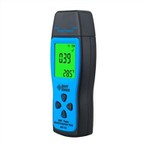
①Turn on the power.
②Open the photodetector cover and place the photodetector horizontally in the measuring position.
③Choose the suitable measurement gear.
If only "1" is displayed on the left end of the display, it means that the illumination is excessive, and you need to press the range key (⑧ key) to adjust the measurement multiple.
④The illuminance meter starts to work and displays the illuminance value on the display screen.
⑤ The data displayed on the display screen changes constantly. When the displayed data is relatively stable, press the HOLD key to lock the data.
⑥Read and record the observations displayed in the reader. The observed value is equal to the product of the number displayed in the readout and the span value.
For example: 500 is displayed on the screen, the display status in the lower right corner is "×2000", and the illuminance measurement value is 1000000lx, that is (500×2000).
⑦Press the lock switch again to cancel the reading lock function.
⑧ During each observation, three consecutive readings are made and recorded.
⑨ After each measurement is completed, press the power switch key to cut off the power supply.
⑩Cover the photodetector cover and put it back in the box.