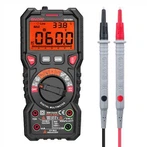
How to measure temperature with a digital multimeter?
1) Connect the plugs at both ends of the thermocouple to the voltage terminal according to the positive and negative polarity.
(2) Turn the knob to the temperature gear Celsius ℃. The blue button on the right side of the meter switches the temperature unit to Fahrenheit℉.
(3) With zero point compensation function, press the yellow Setup key and the backlight key at the same time to enter the adjustment mode, and use the up and down arrow adjustment keys on the upper right to adjust the reference zero point in both directions.
(4) When the adjustment is completed and confirmed, please press the yellow Setup button and the backlight button at the same time.
(5) Press the yellow Setup key and Hz%ms key to exit the adjustment mode.
What are the general methods for digital multimeter troubleshooting?
Answer: A digital multimeter is a measuring instrument that uses the principle of analog/digital conversion to convert the measured value into a digital quantity and display the measurement result in digital form. Compared with the pointer multimeter, the digital multimeter has the advantages of high precision, fast speed, large input impedance, digital display, accurate reading, strong anti-interference ability, and high degree of measurement automation, so it is widely used. However, if used improperly, it is easy to cause failure.
Digital multimeter troubleshooting should generally start with the power supply. For example, if there is no display on the LCD after turning on the power, first check whether the voltage of the 9V laminated battery is too low; whether the battery leads are disconnected. Finding faults should follow the order of "first inside and then outside, first easy and then difficult". Digital multimeter troubleshooting can be roughly carried out as follows:
(1) Visual inspection:
You can touch the battery, resistors, transistors, and integrated blocks to see if the temperature is too high. If the newly installed battery heats up, it means that the circuit may be short-circuited. In addition, the circuit should also be observed for disconnection, desoldering, mechanical damage, etc.
(2) Detection of working voltage at all levels:
To detect the working voltage at all levels and compare it with the normal value, the accuracy of the reference voltage should be ensured first, and it is best to use a digital multimeter of the same model or similar to measure and compare.
(3) Waveform analysis:
Use an electronic oscilloscope to observe the voltage waveform, amplitude, period (frequency), etc. of each key point of the circuit. For example, test whether the clock oscillator starts to oscillate, and whether the oscillation frequency is 40 kHz. If the oscillator has no output, it means that the internal inverter of TSC7106 is damaged, or the external components may be open. Observe that the waveform at pin {21} of TSC7106 should be a 50 Hz square wave, otherwise, the internal 200 frequency divider may be damaged.
(4) Measuring element parameters:
For components within the fault range, perform on-line or off-line measurements, and analyze parameter values. When measuring resistance online, the influence of components connected in parallel with it should be considered.
(5) Hidden troubleshooting:
Hidden faults refer to faults that appear and disappear from time to time, and the instrument is sometimes good or bad. This kind of failure is more complicated, and the common reasons include weak welding of solder joints, looseness, looseness of connectors, poor contact of transfer switches, unstable performance of components, and constant breakage of leads, etc. In addition, it also includes some external factors. For example, the ambient temperature is too high, the humidity is too high, or there are intermittent strong interference signals nearby.