How to measure voltage with digital multimeter
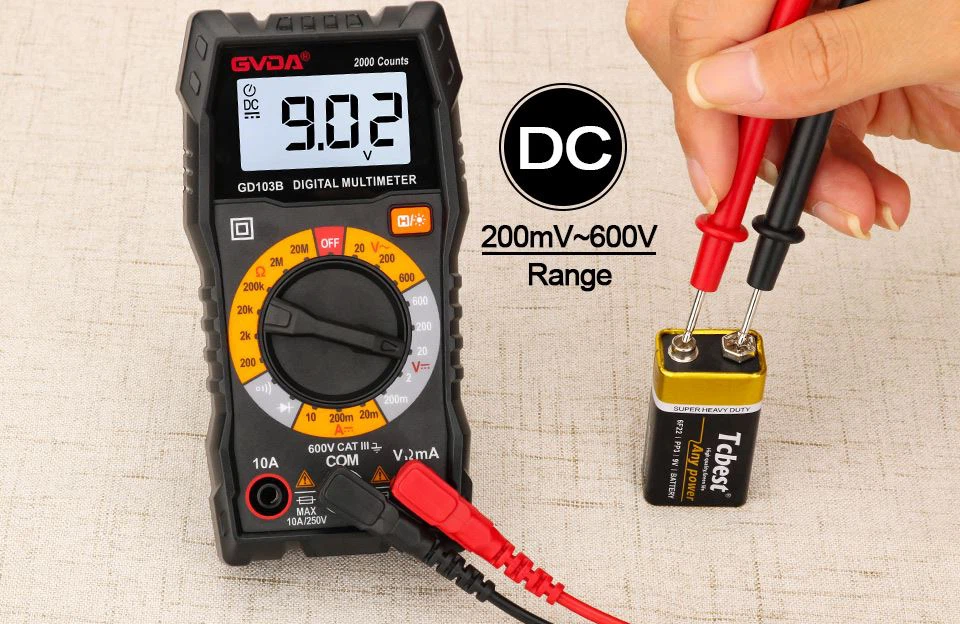
First, measure the DC voltage
1. Insert the black test lead into the COM jack and the red test lead into the V/Ω jack.
2. Put the function switch in the DC voltage range V-range, and connect the test lead to the power supply to be tested (to measure the open circuit voltage) or the load (to measure the voltage drop of the load). The polarity of the red lead will be displayed at the same time. on the display.
Notice:
1. If you do not know the voltage range under test, set the function switch to the maximum range and gradually decrease it.
2. If the display only shows "1", it means over-range, and the function switch should be set to a higher range.
3. "" means do not measure voltages higher than 1000V, it is possible to display higher voltage values, but there is a risk of damage to the internal circuit.
4. When measuring high voltage, pay special attention to avoid electric shock.
Second, measure the AC voltage

1. Insert the black test lead into the COM jack and the red test lead into the V/Ω jack.
2. Set the function switch to the AC voltage range V~ range, and connect the test pen to the power supply or load to be tested. The test connection diagram is the same as above. When measuring AC voltage, there is no polarity display.
Precautions:
1. See DC Voltage Note 1.2.4.
2. "" means do not input a voltage higher than 700Vrms, it is possible to display a higher voltage value, but there is a risk of damaging the internal circuit.