How to Reset and Calibrate Infrared Thermometers
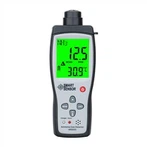
1. The first step is to long press the red button in the middle of the button. It should be noted that it takes up to 10 seconds for the infrared thermometer to automatically reset to factory settings.
2. Next is to perform calibration settings, and then turn to the side of the infrared thermometer. It should be noted that there is a groove here.
3. Then you need to push it forcefully to the right with your hand or screwdriver to open it.
4. After opening it, you can see a temperature selection switch on the battery compartment inside, with the default position at ℃ (Celsius).
5. Then you need to move the switch to the "℉" position to set the temperature display unit to Fahrenheit ℉.
6. The final step is to close the battery cover, at which point you can see that the display screen has switched to Fahrenheit temperature, and the calibration is complete.
How to calibrate an infrared thermometer
The calibration and measurement department of the infrared thermometer presents two types: inspection report and calibration certificate:
1. Inspection report: It is the temperature point specified by the infrared thermometer for testing, and the criteria are given according to the product standard, whether it is qualified or unqualified.
2. Calibration certificate: It is to detect the designated temperature point of the infrared thermometer and provide a reference value between the standard temperature and the actual reading of your product.
For users, a 'calibration certificate' is better. But neither of these certificates can make products with deviations accurate. To achieve accuracy, especially for infrared thermometers, only manufacturers can do it, which is professionally referred to as "calibration".
In addition, if it is an online infrared thermometer, it can be "calibrated" through other methods.
Calibration of infrared thermometers is a tedious procedure that requires professional personnel to calibrate, and must be done at the metrology department or product manufacturer.