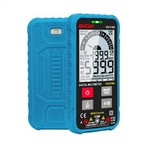
A multimeter (also known as a voltmeter or VOM) is a device that measures resistance, voltage, resistance, and continuity. No matter what test you're doing, the black test lead will always be plugged into the COM terminal, while the red test lead will move according to your measurements. Before testing, take measurements with the black and red probes, turn the multimeter to the correct setting and power off the circuit.
1. Use the voltage setting to measure AC and DC voltages. AC voltage, or AC voltage, is used to measure things you might find around your house, such as wall sockets, microwaves, or water pumps. DC, DC, and voltage are mainly used to measure batteries. Both types of voltages are measured very similarly, just in a slightly different way. DC voltage is common in cars and other vehicles and is often used during car repairs
2. Insert the test leads into the COM and V terminals. The black test lead will always be plugged into the terminal marked "COM" (common). The red test lead should be plugged into the terminal marked "V" marked "Voltage" as this is what you will be testing. With this setup, test leads are used to measure AC and DC voltages.
3. If you want to measure AC voltage, move the dial to V~. Use the AC voltage setting if you want to measure voltage in a wall outlet, in a washer or dryer, in a TV, or in any other electrical system in your home. Look for the V with the tilde next to it, and move the dial to that area.
4. Switch the dial to V⎓ to measure DC voltage. DC voltage or DC voltage measurement battery. DC voltage is represented by V with a horizontal line next to it and a dashed line below it. Find the DC voltage area on your multimeter and move the dial to this section. If you accidentally measure AC voltage on the DC setting, or vice versa, as long as the multimeter's voltage range is set to the highest, it won't damage the multimeter.
5. Set the dial to the next digit for the voltage to be measured. For example, if you want to measure a 1.5V battery, you can move the dial to 2V because that's the next number displayed on the multimeter. If you are not sure about the voltage of the object you are measuring, set the dial to a higher number. You can always move it to a lower number for better reading. If you are measuring batteries, remember that your dial will be set to a number in the DC voltage area. If you're using AC voltage to measure current in a wall outlet, you can set the dial to 200V in the AC section if the outlet is 110V.
6. Place wire probes on the positive and negative sections to measure DC voltage. The black probe should be placed on the negative side of the battery, while the red probe should be placed on the positive side of the battery. Secure the probes to their respective ends by hand, making sure that the probes touch the positive and negative metal parts. If you're not sure which end is positive and which is negative, try putting a probe on each end and see what your multimeter says. If a negative number is displayed, both your positive and negative numbers will toggle.
7. Place the probe on the correct wall outlet to measure AC voltage. To measure voltage in a wall socket, the black probe goes into the larger slot and the red probe goes into the smaller slot next to it. To avoid electric shock, keep your fingers away from the tip of the probe when holding the probe close to the wall outlet. Do not let the probes touch each other.
8. Check the digital multimeter reading to see the voltage. Once the probe is in place, you will get a reading on the multimeter telling you the voltage you are testing. Look at the digital screen for a reading, and write it down if needed. Looking at your readings will tell you if the voltages you are measuring are average. For example, if you measure a wall outlet and the multimeter reads 100V, the average is lower than the 120V average, letting you know that the wall outlet has low voltage.