How to use a multimeter to select a computer power source
Nowadays, the new generation of graphics cards, sound cards, optical drives, hard drives and other accessories are not fuel-efficient in terms of power consumption. When you stuffed your love machine with fat, have you ever thought that you should match it with a strong heart.
There have been many high-level discussions on the identification methods of power supplies in various newspapers and magazines. To sum up, there are roughly three points: first look - to see whether the materials used in the power supply are excellent, whether the workmanship is fine, and whether the layout is reasonable. To be honest, this plan is somewhat overpowering. First of all, it requires the implementer to have sufficient electronic knowledge; secondly, if you want to have a thorough look at the internal organs and six lungs of the power supply, you really have to uncover the cover of the power supply, which will inevitably destroy the warranty seal of the merchant. Once the seal is broken, it will be automatically lost. The merchant's warranty, even if there is a problem with the power supply, I have to DIY. I think many ordinary rookies are forced to become prawns in desperation and helplessness.
The second touch - refers to touch whether the wind blowing from the power supply fan is hot and whether the cover is hot after starting the machine for a period of time.
Three smells - smell whether the power supply will emit a burnt smell after working for a long time. The last two are purely the accumulation of perceptual experience, how can a novice make a judgment without experience at all?
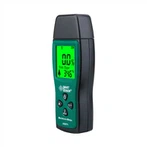
Here, I recommend a method of using a multimeter to judge whether the power supply is good or bad, which may provide some help for novices. First of all, of course, find a multimeter (preferably digital), and you must be able to use a multimeter. The voltage provided by the aTX power supply mainly includes 3.3V, 5.0V, and 12.0V. Among them, 12.0V is the main energy source for driving hardware devices, and the change is most obvious after connecting more loads, so after connecting all the loads of the computer Finally, choose a free output head, insert the black test lead into the black line interface, and the red test lead into the yellow line interface (the purpose is to detect the 12V output voltage). After connecting the plug connectors, you can start the test.
After booting, we can find that the data of the multimeter is constantly changing, and it does not stabilize until the system is fully started. Write down the voltage value at this time. Normally it should be around 12V (about 11.95V ~ 12.15V, too low to ensure long-term stable operation of large loads, and has no expansion potential, too high will cause the device to heat up, too high premature aging). Then press the rESET key to restart the machine. At this time, pay close attention to the change of the value of the multimeter, and the value of the multimeter will reach the lowest point during the power-on self-test. Note down the voltage value at this time. If the voltage difference between the highest voltage value and the lowest value is not too large (within 0.3V), the power supply is acceptable. If the pressure difference is too large, it means that the load capacity of the power supply is poor, so it is not suitable for selection. I personally have encountered a 300W power supply, its highest value is 12.32V but the lowest is only 11.73V, and it frequently crashes when used.
Finally, observe the situation in use. Run all kinds of software, and at the same time use the CD-ROM to listen to music, so that all parts of the machine can work. Pay attention to the voltage at this time, if there is no obvious fluctuation, it can be selected.