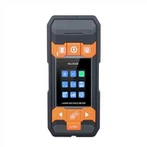
How to use the handheld laser rangefinder and precautions
1. Install/replace the battery.
①Press the removal button, push to the left to remove the back cover.
② Open the cover of the battery slot to install or replace the battery.
③When the battery power is too low, the screen will display this signal. Install batteries correctly according to polarity, use only alkaline batteries.
④Insert the back cover along the groove until it is in place. When the instrument is not used for a long time, please take out the battery to avoid corrosion.
2. Turn on/off the rangefinder.
Press the red READ key for a short time, the light, battery level and buzzer will be displayed on the display until the first work command is issued. The instrument can be turned off at any time on any menu. When no key is touched for 150 seconds, the instrument will automatically turn off.
3. Clear key (red OFF/CLEAR)
The clear key returns the instrument to normal mode, that is, it returns to zero. Clear key can be used before measurement/calculation or after measurement/calculation. Within a function (area or volume), you can use the clear key to go back to the previous command and take a new measurement.
4. Set the measurement reference side.
Press the datum selection key until the desired datum edge appears. The setting of the measurement reference edge will only change when it is reset or turned off. When the fixed baffle under the instrument is opened, the instrument can automatically identify the measurement reference side and set the measurement reference side to obtain the correct measurement value. Manufacturer setting: The measurement reference edge is the trailing edge.
5. Measure.
5.1 Single distance measurement.
Press the READ key, turn on the laser beam, aim the instrument at the target to be measured, and then press the READ key. The measured distance data will be immediately displayed on the display in the specified unit.
5.2 Measure Min/Max values.
This function can measure the minimum and maximum distances starting from a fixed point, and measure the separation distance.
Press and hold the READ key until a beep is heard, then the instrument enters the continuous measurement mode, and then sweeps the laser slowly in front of and behind the target.
Press the READ button again to terminate the continuous measurement mode, and the measured maximum or minimum distance will be displayed in the main display area on the screen.
6. Function.
6.1 Addition and subtraction.
Addition and subtraction of measured values are carried out as follows: Measured +/- Measured +/- Measured +/... = Result. The same method can increase or decrease area and volume.
6.2 Area.
Press the Area/Volume key to measure the area. The two necessary measurements are taken and the corresponding results are displayed on the screen.
6.3 Volume.
Press the area/volume key twice to measure the volume and the corresponding icon will appear on the display. After the three necessary measurements, the corresponding results are displayed on the screen.
6.4 Indirect Measurements.
The instrument can calculate distance by Pythagorean law. This function is suitable for edges that are not suitable for direct measurement or are dangerous.
(1) This method is only used to measure distance and cannot replace accurate measurement.
② Determine the order of measuring sides.
③All measurement points must be perpendicular or parallel to the plane.
④In order to ensure the accuracy of the measurement, it is best for the instrument to rotate from a fixed point to measure.
6.5 Save constants/measured values Save constants/measured values.
6.5.1 Storing constants.
A common value can be saved for recall. Measure the desired distance, press and hold the memory key until you hear a beep, then save the desired value.
6.5.2 Readjustment of constants.
Press the storage key to recall the constant, and the constant can be calculated at this time.
6.5.3 Latency measurement.
Press the timing button, the corresponding time will flash on the screen, press the +/- button to adjust the required delay time, and then press the READ button, then the countdown will start until the value will be displayed on the display after the measurement.
Note the use of a handheld laser rangefinder.
1. Pay attention to the positive and negative poles when installing the battery, and only use alkaline batteries.
2. When measuring, do not point the laser directly at the sun, eyes or irradiate the eyes through reflective surfaces (such as mirror reflection).
3. Be careful when using it, and avoid placing it in a place that is too humid, high temperature or exposed to direct sunlight.
4. The sunlight is too strong, the ambient temperature fluctuates too much, the reflection effect of the reflective surface is weak, and the error of the measurement result is large when the battery is low. In this case, it is better to use it with the target reflector.
Maintenance of handheld laser range finders.
1. It is forbidden to store the instrument in a high temperature and high humidity environment for a long time. When the instrument will not be used for a long time, please take out the battery, put the instrument in the random instrument case, and store it in a cool and dry place.
Please keep the surface of the instrument clean. Use a damp soft cloth to wipe the dust on the surface of the instrument. Do not use aggressive lotion to clean the instrument. You can wipe the laser window and focusing mirror according to the method of wiping the surface of an optical instrument.