Why is measuring moisture in paper and packaging products important?
Paper and its related products are widely used in the packaging industry and are prone to damage when there is too much moisture in these products. Moisture also plays an important role in evaluating material properties, which is beyond doubt. Controlling the moisture content present in the product will enable you to produce good products for customers. Therefore, it is very important for you to maintain the moisture content in these products through effective testing.
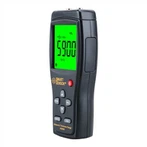
The handheld moisture meter tester is an effective testing device that allows you to analyze the exact moisture content present in paper and packaging materials. Whenever you choose this laboratory testing equipment, you need to keep some things in mind when choosing this product. Other factors include correct atmospheric conditions, repeatability of inspections, and their quality.
Now, let's discuss the modes available when pressing the MODE button in the hygrometer.
When pressing the MODE button in the moisture meter, different types of modes can be used
1. Check the average reading
If the user presses the "Press Measure Key" button while displaying the information or after displaying the measurement reading, the average reading, total reading, highest and lowest readings will be displayed. (Each paper type can store up to 100 readings)
2. Set restrictions for the selected paper type (UPPER and POWER)
Users can use the "Enter" key to access restrictions, and the "UP" and "Left" keys are used to set restrictions. After setting appropriate restrictions, the "Enter" key is used to store restrictions.
Clear data (delete readings stored for the selected paper type)
The moisture measured by the instrument can be stored in the memory of the unit, and a total of 100 readings can be stored in the memory of each paper type. To clear the stored reading, press the "Enter" key and prompt the user to press the "Enter" key again to clear the data for the selected paper type in memory.
3. Selected Type
In this mode, you can select a paper type. Press the "Enter" key to view the selected paper type, use the "UP" key to select a paper type, and press the "Enter" key to confirm the selection. The digital moisture meter mainly provides three paper selection modes.
a) Paper (4.7-18.2%)
b) User calibration (8-100%)
c) Packaging waste paper (6-40%)
These are the different modes available in this handheld moisture meter.