Introduction of H-D510 Handheld Laser Rangefinder
1. Product introduction
Intrinsically safe laser range finder for mining has precision self-calibration, maximum/minimum value measurement, continuous measurement, area/volume measurement, triangle/Pythagorean theorem measurement, addition and subtraction measurement, angle measurement, stakeout/delay measurement, inclination measurement and other functions. The shell of the instrument is made of ABS engineering plastics, and the key part is made of double-injected non-slip soft rubber, which is ergonomic. The instrument can store data, up to 50 meters jingque measurement.
LCD display
1. Turn on the laser
2. Measure the reference edge (front edge)
3. Measure the reference edge (back edge)
4. Measure the reference edge (tripod hole)
5. Measure the reference side (multi-function bracket)
6. Multiple measurement functions
7. Use the Pythagorean theorem to measure
8. Continuous measurement and large/small measurement
9. Instrument error alarm
10. Number of historical records
11. Battery power
12. The third auxiliary display line
13. The second auxiliary display line
14. Auxiliary display line
15. Calculation result or main display line
2. Button function
1. Measurement key
2. Volume/area key
3. Indirect measurement (Pythagorean theorem) key
4. Add key
5. History key
6. Minus key
7. Reference key
8. Clear/shutdown key
9. Unit switching key
3. Initial operation and setting
1. Power on and off
Turn on the instrument and laser
Press the button for a long time to turn off the instrument, and the instrument will automatically turn off after 3 minutes without operation
Clear key: the last command is canceled or cleared. In the historical storage browsing mode, press the storage key and the clear key at the same time to clear all historical data
The setting of the measurement reference edge, the default reference edge setting of the instrument is the trailing edge.
Button: Press the button and the measurement will take the front edge and the back edge as the measurement reference edge respectively. When changing the measurement reference edge, there will be different beeps to remind you. After restarting the machine, the distance measurement reference edge will return to the default value (back edge)
4. Measurement
1. Single distance measurement
Button: Start the laser, press the button again to trigger the measurement, and the measurement result will be displayed on the display immediately
2. Continuous measurement, maximum/minimum value
●The continuous measurement function enables the user to measure a large or small distance from a measurement point, such as measuring a diagonal distance (large measurement value) or a horizontal distance (small measurement value)
●Long key until the buzzer sounds, the display enters the continuous measurement mode, and the laser sweeps a large area around the measurement target
●Press the key to stop continuous measurement, the corresponding large or small value and the last measured value will be displayed on the main display
●The instrument will automatically exit the continuous measurement mode after 1000 continuous measurements
●When the battery icon keeps flashing on the display, the battery should be replaced in time
●If the instrument is not used for a long time, please take out the battery to prevent the battery from corroding the tester
Five, function
1. Add/subtract distance measurement
Press once, the plus sign on the second auxiliary display line will flash, press the key to measure a value, and it will be displayed in the auxiliary line, press the key, the summed result will be in the main display line, press the key again, the above accumulated result will be automatically displayed in the auxiliary line, the next The measured value will be added to the previous value. By analogy, the distance of many pens can be accumulated, and the last step is to press to exit to the single distance measurement mode.
Press once, the minus sign on the second auxiliary display line will flash, press the key to measure a value, and it will be displayed on the auxiliary line, press the key, the result of subtraction will be displayed on the main display line, press the key again, the above subtraction result will be automatically displayed on the auxiliary line, the next The measured value will be subtracted from the previous value, and so on, the distance of many pens can be decremented, and the last step is to exit to the single measurement mode.
2. Area function
Press the key once, the icon will appear on the display
Press the key for a distance measurement (e.g. length)
Press the key again for a second distance measurement (like width)
The calculation result of the area will be displayed in the main display line, and each single measurement result will be displayed in the secondary display line.
3. Volume measurement
Press the key three times, the icon will appear on the display
Button: Carry out a distance measurement (length)
Key: Take second distance measurement (width)
Key: Take third distance measurement (height)
The final volume measurement results are displayed in the main display line, and the first three measurement results are displayed in the second and third auxiliary display lines respectively.
4. Indirect measurement
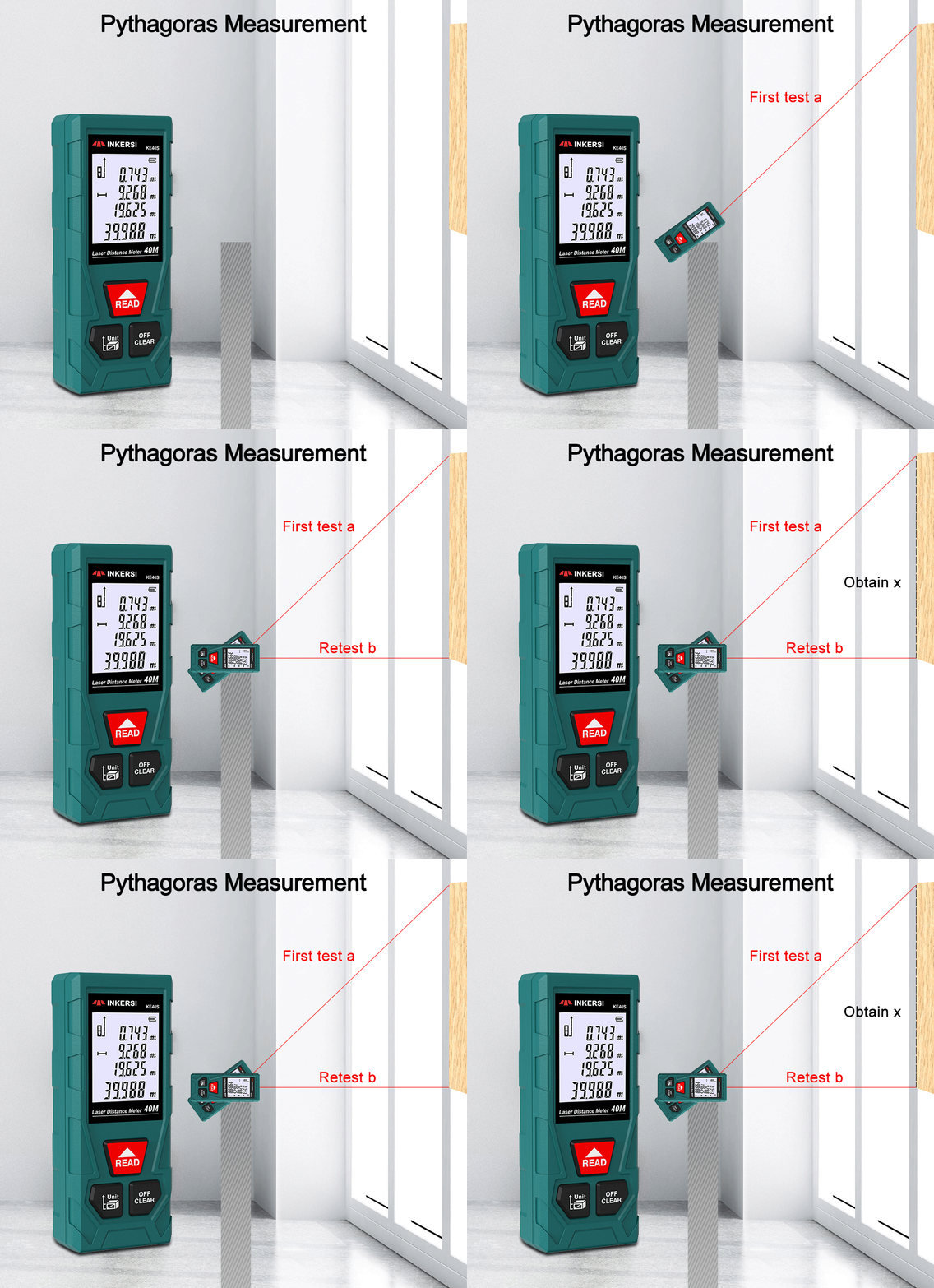
●This instrument can use the Pythagorean law to automatically calculate the distance (it must be measured from the same starting point). This function is designed for measuring places that are difficult to reach. For example, to measure the height of G, a second measurement is required. The steps are as follows:
Press the button once: the icon will be displayed on the display, and the icon of the measured distance to be measured will flash on the display.
Button: Measure the distance H of the hypotenuse of the triangle
Button: measure the distance L of the right-angled side of the triangle, and try to keep the instrument level when measuring.
If the measurement results meet the requirements of the Pythagorean law (the distance between the hypotenuse is greater than the distance between the right-angled sides), the height G to be measured will be displayed on the main display line, and the intermediate measurement values will be displayed on the second and third auxiliary display lines respectively.
●Indirect measurement (twice use the Pythagorean law to determine a certain distance) Press the button twice: the icon will be displayed in the display, and the icon of the measured distance will flash on the display.
Button: To measure the upward distance, measure the hypotenuse H1 of a triangle, after the measurement is completed, it will display a prompt to measure the right-angled side of the triangle, and try to keep the instrument as horizontal as possible.
Button: measure the horizontal distance, measure the common right-angled side L of two triangles, after the measurement is completed, a prompt will be displayed to measure the third measurement value.
Button: To measure the downward distance, measure the second triangle hypotenuse H2, if the measurement result meets the requirements of the Pythagorean law, the height G that needs to be measured indirectly will be displayed on the main display line, and the intermediate measurement values will be displayed on the , 2, and 3 auxiliary lines respectively. display line (must make sure to measure from the same starting point)
5. History storage
Press the key, the last measurement result will be displayed in the main display line, the previous 20 measurement or calculation results will be arranged in reverse order, you can use the plus and minus keys to browse, press the history record key and clear key at the same time in the historical record browsing mode to clear All historical data records.
6. Instrument distance unit setting:
The following are selectable setting units
Press the button to switch the distance unit until the unit to be selected, m, in, ft, ft+in
Four, product matching
1. One laser rangefinder
2. Plastic instrument box
3. Instrument lining
4. Product Manual
5. Product certificate