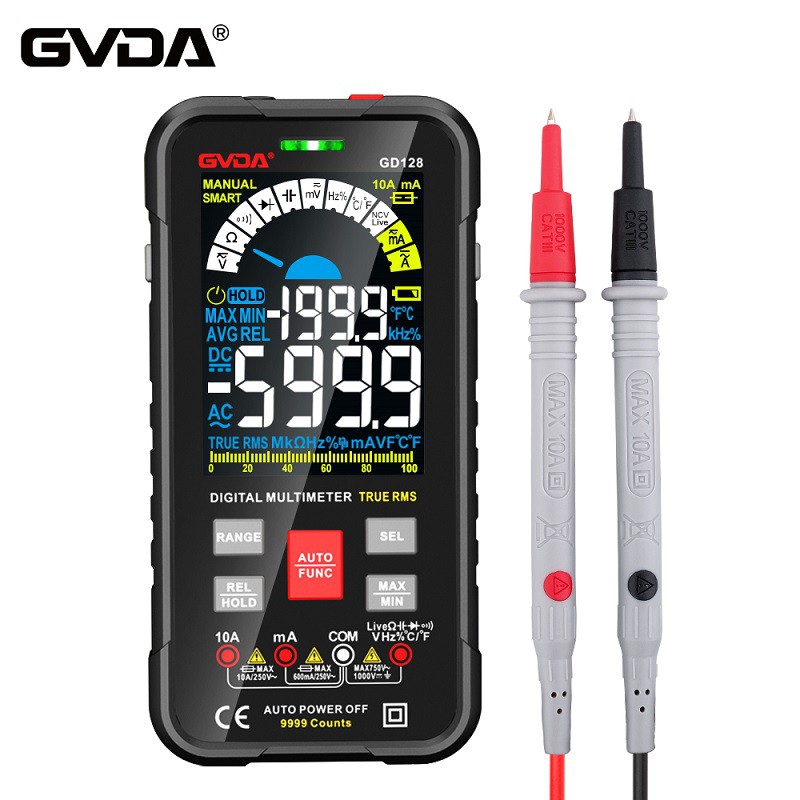
Teach you how to use a multimeter to measure electronic components
Measuring the DC voltage of a new battery with a multimeter
Firstly, start with the initial voltage measurement. A multimeter is used to measure DC voltage, such as batteries and digital device power supplies. Insert the black pen plug into the COM port at the bottom right of the multimeter, and the red pen plug into V Ω. Then rotate the middle knob to the maximum estimated range ("V -" is the DC voltage range, "V~" is the AC voltage range, and "A" is the current range). The next step is to use two red and black pens to touch the two ends of the battery/power supply. If the meter displays "1" at this time, the range is too small. Continue to increase the range and measure. When the symbol "-" appears on the left side of the value, it indicates that the polarity of the ratio is opposite to that of the battery/power source.
AC voltage measurement is the same as DC voltage measurement, the difference is that the knob in the middle is in AC mode "V~", and AC voltage does not have positive or negative values, so it can be measured according to the DC voltage measurement method. Additionally, during use, do not touch the metal parts with a red to black ratio with your hands.
Using a multimeter to measure current
The measurement of current also requires inserting the black pen into the COM port first. When measuring DC current, there are size settings. If the measured current is greater than 200mA, insert the red nose into the "10A" port and turn the knob to the DC "10A" position; If it is less than 200mA, insert the red nose into the "200mA" port and turn the knob to the appropriate range within 200mA DC. When measuring, string the multimeter into the circuit. If the reading is "1", increase the range; If the "-" symbol also appears, the current flows from the black pen into the multimeter.
AC power measurement is the same as DC power measurement, with the difference being that the knob is in the AC gear. When measuring AC power, it is important to note that after the measurement is completed, the red nose should be plugged back into the "V Ω" position. Otherwise, if the voltage is accidentally measured, either the meter or the power supply will be damaged.
When measuring resistance, insert two pens into the COM and V Ω ports respectively, and turn the knob to the appropriate range in "Ω". Then use a pen to touch the metal at both ends of the resistor. If the unit is in the "200" range, it is "Ω", while the 2K and 200K ranges are "K Ω". Similarly, if the unit is above 2M, it is "M Ω".
Measuring the quality of diodes with a multimeter
When measuring diodes such as light-emitting diodes and rectifying diodes, connect a red pen to the positive terminal of the diode (if you don't know how to determine the polarity of the diode, you can refer to the tutorial on how to identify the polarity of the circuit board components) and a black pen to the negative terminal. At this time, the forward voltage drop of the diode is displayed. The voltage drop of Schottky diodes is about 0.2V, while that of ordinary silicon rectifying diodes is about 0.7V, and that of light-emitting diodes is between 1.8 and 2.3V. Swap two strokes, if it shows "1", the diode is normal (diode characteristics), otherwise, the diode is scrapped~