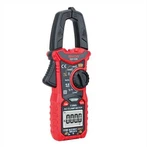
The digital multimeter measures the voltage. Which two positions are the red and black pens inserted?
1. Measurement of AC/DC voltage: Turn the range switch to the appropriate range of DCCV (DC) or ACV (AC) as required, insert the red stylus into the V/Ω hole and the black stylus into the COM hole, and connect the stylus in parallel with the tested line, and the reading will be displayed.
2. Measurement of AC/DC current: Turn the range switch to the appropriate range of DCA (DC) or ACA (AC), insert the red stylus into the mA hole (< 200ma) or the 10A hole (> 200ma), insert the black stylus into the COM hole, and connect the multimeter in series in the circuit under test. When measuring direct flow, the digital multimeter can automatically display polarity.
3. Resistance measurement: Turn the range switch to the appropriate range of Ω, insert the red stylus into the V/Ω hole, and insert the black stylus into the COM hole. If the measured resistance exceeds the maximum value of the selected range, the multimeter will display 1, and a higher range should be selected at this time.
When measuring resistance, the red stylus is the positive electrode and the black stylus is the negative electrode, which is just the opposite of pointer multimeter. Therefore, when measuring polar components such as transistors and electrolytic capacitors, we must pay attention to the polarity of the stylus.
Extended data:
Digital multimeter is a relatively simple measuring instrument. In this article, the author will teach you the correct use of digital multimeter. Starting with the measurement methods of voltage, resistance, current, diode, triode and MOS field effect transistor of digital multimeter, you can better master the measurement methods of multimeter.
Before use, you should read the relevant instructions carefully and be familiar with the functions of power switch, range switch, jack and special jack. Turn the ON/OFF switch to the ON position and check the 9V battery. If the battery voltage is insufficient, it will be displayed on the display. At this time, the battery needs to be replaced. If the monitor does not display, follow these steps.
The symbol next to the test pen jack indicates that the input voltage or current should not exceed the indicated value, which is to protect the internal circuit from damage. Before the test The function switch should be placed in the required range.