How to use digital multimeter to measure PT100 temperature sensor
Multimeter is a multi-purpose electronic measuring instrument, which can have many special functions, but its main function is to measure voltage, resistance and current. Multimeters are divided into digital multimeter and traditional multimeter with electromagnetic deflection of pointer.
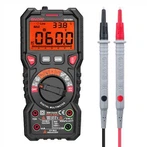
Measuring resistance with digital multimeter is very simple, just set the gear to ohm gear and read it. The resistance range is divided into seven grades: 200Ω, 2kΩ, 20kΩ, 200kΩ, 2MΩ and 20MΩ. When measuring, put the range change-over switch in Ω range, insert the black stylus into COM jack, and insert the red stylus into V/Ω jack to read. However, it should be noted that when measuring resistance in the circuit, the power supply should be cut off.
If the nominal resistance is 10K, set the gear of the digital multimeter to 20K (the gear that is larger than the resistance and closest to the internal resistance can get the maximum measurement accuracy), then insert the black stylus into the COM hole (black), insert the red stylus into the VΩ hole (red), and then contact the resistor 2 with the stylus.
It should be noted that if the resistance value is large, don't touch the terminal 2 of the resistor with both hands, because the human body also has resistance. Touching the terminal 2 is equivalent to the parallel connection of the measured resistance and the human body resistance, which will cause test errors. It doesn't matter if you touch one hand, so you can get the resistance reading.
How to use the digital multimeter to measure PT100 is to first adjust the digital multimeter to 200 ohms, and then use two pens of the multimeter to hit the two pins of PT100 respectively. If there is more than 100 ohms display on the digital display screen and the displayed data is stable, it proves that the measured PT100 temperature sensor is a normal product. The above is the specific test method.